
Attorney Share sends users email notifications for all things needing your attention. To learn more about our notification preferences and how to adjust them to best serve your firm's needs please continue below.
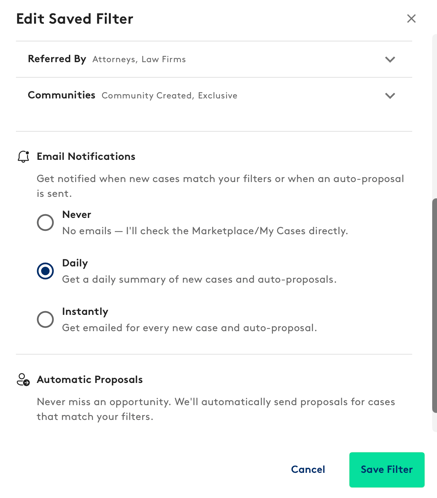
New Case Notifications: Never miss a referral opportunity! Get real-time notifications to your Email when new cases matching your Saved Filters hit the Marketplace!
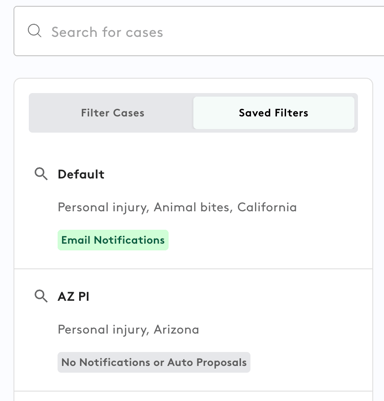
To create a new saved filter, go to Marketplace > select filters > select Email Notification > "Save Filter".
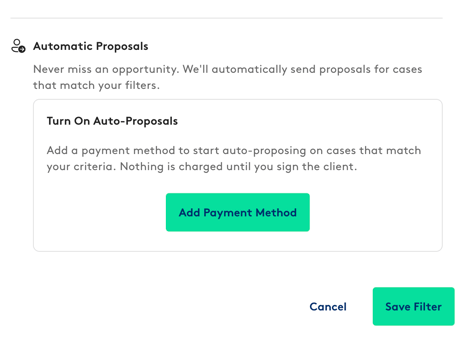
Auto-Propose: Enable Auto-Propose on a saved filter to have the system automatically send a proposal when a new case matches your criteria. Proposals are sent according to your set fee percentage, so you never miss a qualified match.
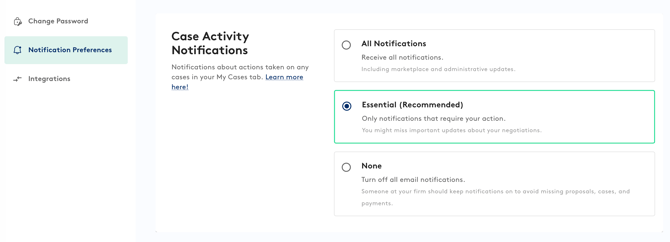
Case Activity Notifications: Control how you receive important Email updates about activity on Attorney Share. Choose the notification level that works best for you, ensuring you stay informed without unnecessary distractions. Update your preferences anytime to match your workflow, please see descriptions below:
- Case Manager assigned/ removed from a case
- Case created by a Firm User Case manager sends proposal on your behalf
Essential: Notifications for items requiring action from you:
- Receive a case invitation
- Receive a proposal or counteroffer
- Match fee charged
None: Be advised, we recommend one person in the firm to have notifications on if this option is selected.
Please allow up to 24 hours for changes to apply. If you run into any issues, please reach out to support@attorneyshare.com